
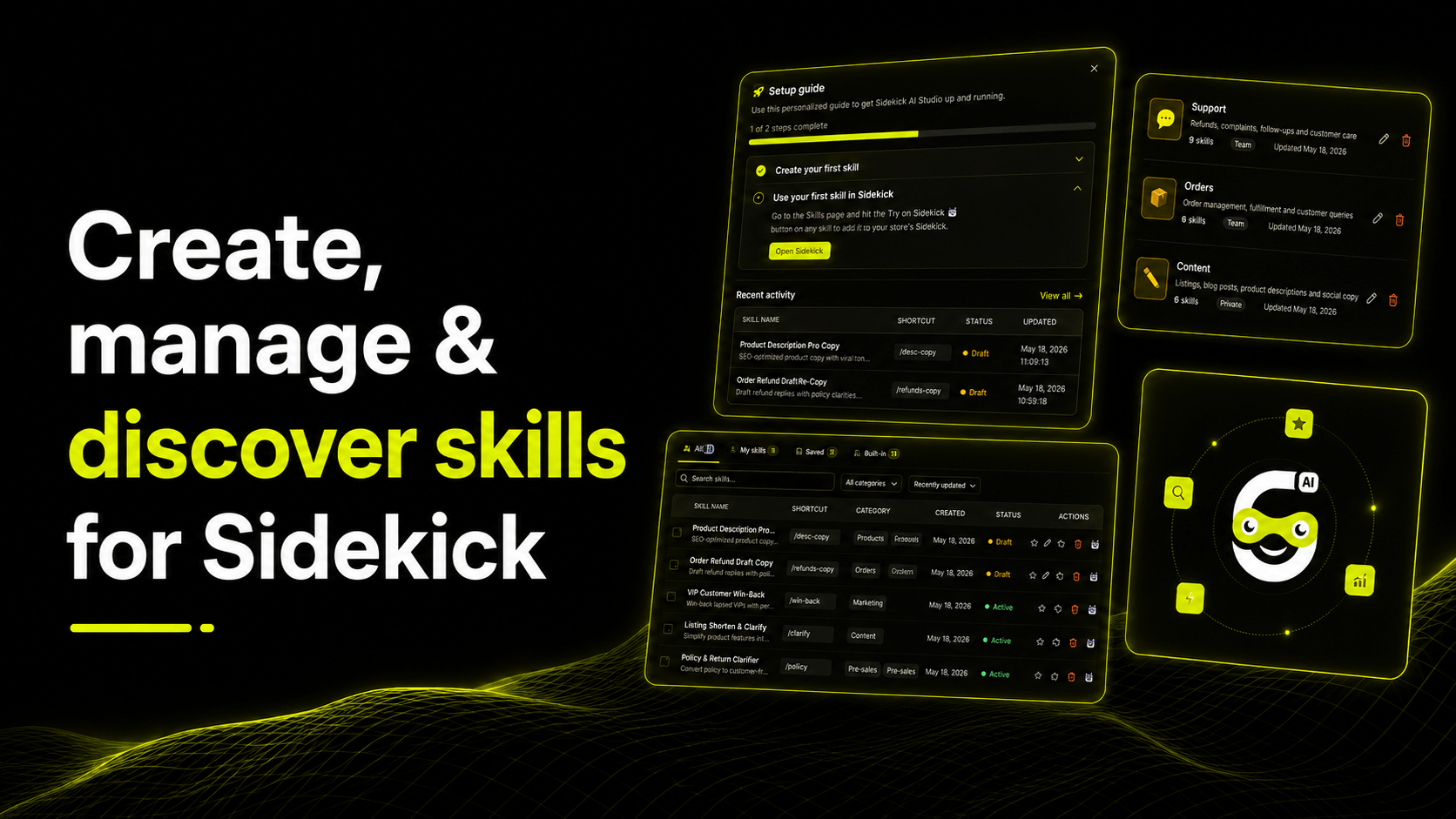

Discover Sidekick AI Studio by ShopiDevs, a skills library for Shopify merchants to browse ready-made skills, create custom prompts, and save reusable Sidekick workflows.
Running a Shopify store involves many repetitive tasks, from writing product descriptions and answering customer questions to creating refund replies, marketing copy, order updates, and store-specific workflows. Doing these tasks manually every time can be time-consuming and inconsistent.
To make this process easier, ShopiDevs has released Sidekick AI Studio, a skills library built for Shopify merchants using Sidekick. The app helps merchants discover ready-made skills, create custom skills with their own prompts, and save useful Sidekick prompts as reusable skills they can run anytime.
What Is Sidekick AI Studio?
Sidekick AI Studio is a smart skills library designed to make Sidekick more practical, organized, and reusable for Shopify merchants.
In this app, a “skill” works like a reusable AI workflow or prompt. Instead of writing the same instruction again and again, merchants can save it once as a skill and use it whenever they need.
For example, if a merchant frequently writes SEO-friendly product descriptions, they can create a skill with their preferred tone, structure, product details, and formatting rules. Later, they can run that skill anytime to generate consistent product copy faster.
How Does Sidekick AI Studio Work?
Sidekick AI Studio focuses on three main actions: discovering, creating, and reusing skills.
Merchants can browse and install ready-made skills built for real store tasks. These skills are designed around common Shopify workflows, such as product content, customer support, refunds, order management, marketing, and store communication. Instead of starting from scratch, merchants can choose a skill that already fits their task and start using it with Sidekick.
They can also create their own skills with custom prompts tailored to their store. Every store has its own brand voice, policies, products, and customer handling process. Sidekick AI Studio allows merchants to build custom skills that match their unique workflows, whether they need friendly customer replies, premium product descriptions, campaign copy, or internal store notes.
Another important feature is the ability to save Sidekick prompts as reusable skills. If a merchant already uses a prompt regularly, they can turn it into a saved skill. This means they do not need to rewrite the same prompt every time. The skill stays available and can be run whenever needed.
Why Is It Useful for Shopify Merchants?
Sidekick AI Studio helps merchants save time by reducing repeated manual work. Many store tasks follow the same pattern, and reusable skills make those tasks faster to complete.
It also helps improve consistency. When the same skill is used repeatedly, outputs follow the same tone, structure, and purpose. This is useful for maintaining a consistent brand voice across product pages, customer emails, support replies, and marketing content.
The app can also make team workflows more organized. Instead of every team member writing their own prompt differently, merchants can build a shared library of reliable skills for common store tasks. This makes AI usage more structured and easier to manage.
What Can Merchants Do With Sidekick AI Studio?
With Sidekick AI Studio, merchants can browse ready-made skills for common store tasks and install them quickly. These may include skills for product descriptions, refund replies, abandoned cart messages, customer win-back campaigns, order support, low-stock reminders, and promotional content.
Merchants can also create custom skills based on their own business needs. For example, a store could build a skill for writing product descriptions in a luxury tone, responding to refund requests according to store policy, creating social media captions for new collections, or generating customer support replies in a friendly style.
Most importantly, merchants can save the prompts they already use in Sidekick and turn them into reusable skills. This transforms Sidekick from a one-time AI assistant into a repeatable workflow tool for daily store operations.
Why Sidekick AI Studio Matters
Shopify merchants are increasingly using AI to work faster, but random prompts can become difficult to manage over time. Sidekick AI Studio solves this by giving merchants a dedicated place to create, manage, and discover skills.
Instead of treating AI prompts as one-time instructions, the app turns them into organized, reusable tools. This helps merchants work more efficiently, maintain better quality, and scale their store operations with less repetitive effort.
Final Thoughts
Sidekick AI Studio by ShopiDevs is a practical productivity app for Shopify merchants using Sidekick. It helps merchants discover ready-made skills, create custom prompts for their own workflows, and save useful Sidekick prompts as reusable skills.
For merchants who want to save time, improve consistency, and make Sidekick more useful for everyday store tasks, Sidekick AI Studio offers a simple and organized way to bring AI into Shopify store management.